The guide provides information on the hotel price structure used on the Spotnana platform.
A hotel price is broken down into four components:
- Base: The room rate before any taxes or fees are applied.
- Tax: The sum of all taxes configured based on the location and the local government regulations (e.g., VAT, GST, occupancy tax, etc).
- Fees: Additional mandatory charges, such as destination fees, resort fees, or city taxes that are not part of the base rate. For example, hotels located in Kyoto, Japan often charge an additional accommodation tax at the property.
- Commission: The percentage or flat fee collected by the supplier for the booking (usually paid by the hotel). The traveler may not have to pay this as part of the total rate. However, in some cases, the commission is also added as part of the total rate and charged to the traveler. The
includesCommissionfield is used to identify if the commission is part of the total rate.
Total rate: The final price, calculated as Base + Tax + Fees + Commission (if applicable).
In the get hotel details endpoint response, the rooms > rateOptions > rateInfo > totalRate object contains all the components mentioned above. Here's a sample API response of the get hotel details endpoint that contains the components of the totalRate object:
// ... payload truncated for focus
{
  "totalRate": {
    "base": {
      "amount": 510.00,
      "currencyCode": "USD",
      "convertedAmount": 469.20,
      "convertedCurrency": "EUR"
    },
    "tax": {
      "amount": 90.00,
      "currencyCode": "USD"
    },
    "roomFees": [
      {
        "amount": {
          "amount": 25.00,
          "currencyCode": "USD"
        },
        "feeType": "RESORT_FEE",
        "displayFee": true
      }
    ],
    "commission": {
      "amount": {
        "amount": 38.25,
        "currencyCode": "USD"
      },
      "commissionPercent": 7.5
    },
    "taxBreakdown": [
      {
        "amount": {
          "amount": 75.00,
          "currencyCode": "USD"
        },
        "taxCode": "OCCUPANCY_TAX",
        "percentage": 9.0
      },
      {
        "amount": {
          "amount": 15.00,
          "currencyCode": "USD"
        },
        "taxCode": "STATE_TAX",
        "percentage": 2.0
      }
    ],
    "includesCommission": false
  }
}
In the example above, the price details are structured as follows:
- The base price is USD 510.
- The tax is charged at USD 90.
- The resort fee is charged at USD 25.
The totalRate of the room for one night is calculated by adding all the above charges (base + tax + resort fee). The taxBreakdown object explains the different types of taxes charged for this room. In this example, the supplier charges an occupancy tax of USD 75 and a state tax of USD 15. This adds up to USD 90 as listed on the tax > amount field.
The includesCommission is a boolean field that indicates if any commission is included as part of the total rate (i.e., does the traveler have to pay the commission as part of the total rate?). In this scenario, the includesCommission is false, indicating the total price doesn't include the amount mentioned in the commission field. So, the totalRate the traveler will be paying is USD 625 (base rate + tax + resort fee). The hotel may pay the commission separately to the platform provider but the amount will be present in the JSON payload for tracking and accounting purposes.
The nightly rate indicates the price of the hotel room per night. This price is set by the supplier and it may vary on different nights (e.g., weekend rate, festive season rate, etc). In the get hotel details endpoint response, the rooms > rateOptions > rateInfo > nightlyRate object contains the nightly rate information for the selected hotel room.
Here's a sample response from the get hotel details endpoint containing the nightlyRate for two nights:
// ... payload truncated for focus
"nightlyRate": [
  {
    "base": {
      "currencyCode": "USD",
      "amount": 153.0
    },
    "tax": {
      "currencyCode": "USD",
      "amount": 17.98
    }
  },
  {
    "base": {
      "currencyCode": "USD",
      "amount": 153.0
    },
    "tax": {
      "currencyCode": "USD",
      "amount": 17.98
    }
  }
]
// ... payload truncated for focusThe average nightly rate is the average cost per night for a multi-night hotel booking. It's calculated by dividing the total rate by the number of nights. It's useful when hotels have dynamic pricing (different rates for different nights).
// ... payload truncated for focus
{
  "nightlyRate": [
    {
      "base": {
        "currencyCode": "USD",
        "amount": 329
      }
    },
    {
      "base": {
        "currencyCode": "USD",
        "amount": 329
      }
    },
    {
      "base": {
        "currencyCode": "USD",
        "amount": 400
      }
    }
  ],
  "averageNightlyRate": {
    "base": {
      "currencyCode": "USD",
      "amount": 353
    }
  }
}The published rate is the actual rate of the room as set by the supplier. The total rate is the price paid by the traveler to book the hotel room. In specific bookings where corporate discounts are applied, the total rate might be lower than the published rate. However, in most cases both these rates will be the same indicating that the traveler has to pay full price for the room. In certain cases, some suppliers may provide weekly discounts that are applied when a booking is made for 7 nights or more. In those scenarios, the total rate will be lower than the published rate.
In the get hotel details API, use the publishedRate and publishedNightlyRate to view the actual published rate and the published nightly rate of the hotel room. Also, use the rateDifference field to view the amount of difference between the published rate and total rate. This field is useful when you want to display the total savings when booking a discounted hotel room.
In many locations (e.g., Europe, Asia), the government regulations often dictate that the total price of a product sold must include the taxes and fees. For example, in Europe the price you see on a hotel listing includes the Value Added Tax (VAT) and other fees (e.g., occupancy tax).
In the get hotel details API, you can set the showOnlyBaseFare field as false to display the total rate including taxes and fees. The default setting is based on the traveler's legal entity address (which can be found using the get legal entity API). If the traveler's legal entity address is based in the U.S.A., then the showOnlyBaseFare field is set to true by default. For every other location, it's set as false.
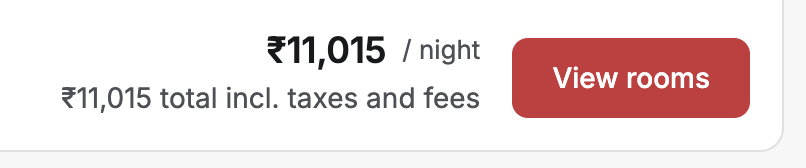
Fig: The price displayed when showOnlyBaseFare is false.
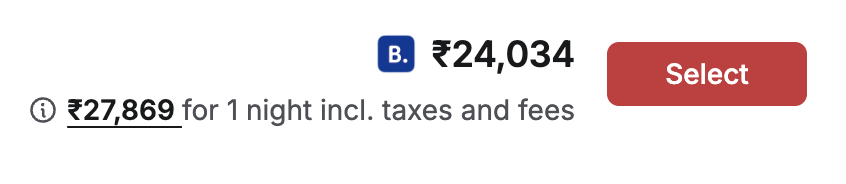
Fig: The price displayed when showOnlyBaseFare is true.
Note: Whether the
showOnlyBaseFarefield is set totrueorfalse, the total rate of the booking will always be displayed below the fare.
As an administrator, when you're updating your company policy to set the maximum allowed budget for travelers, you can use the isTaxIncluded field to define if the budget also includes the taxes and fees. For example, if the maximum price allowed for a hotel booking is set as $500 and the isTaxIncluded field is set as true, then the total price paid by the traveler shouldn't exceed $500 including taxes and fees. In this scenario, a hotel listing with a base rate of $500 and a tax of $50 would be displayed as Out of Policy.